Automating Our Backlog with Cursor Automations, n8n, and Mattermost
What happens when you point an AI coding agent at your Jira backlog and let it work through tickets autonomously — claiming work, writing code, opening PRs, and moving on to the next one?
We built exactly that, and this piece explains how.
At Mattermost, we’ve been experimenting with using Cursor Automations — Cursor’s brand-new background agent system — to autonomously work through development tickets. But Automations on their own aren’t enough.
To make this work reliably, we needed an orchestration layer that could queue tickets, scope the agent’s access, and manage the lifecycle of each task. That’s where n8n comes in.
The result is a pipeline that starts in Mattermost — someone @mentions our internal AI agent, “Matty,” who creates a Jira ticket which gets queued, picked up by a Cursor agent running in a cloud sandbox, and turned into a pull request — all without a human touching the keyboard.
Why We Built This
AI coding agents have gotten remarkably good at turning even a poorly written ticket into a working pull request. But there’s a gap between “this agent can write code” and “this agent can reliably work through a backlog.”
That gap is all orchestration: knowing which ticket to pick up, how to get the full context, and what to do when the code is ready.
Cursor Automations launched in early March 2026 with support for webhook triggers, cloud sandboxes, and MCP integrations. That gave us the execution environment.
But Automations’ built-in trigger and tool logic is still fairly minimal — you get a webhook and some basic configuration. We wanted more control: ticket queuing, filtering, state management, and tightly scoped tools that prevent the agent from wandering outside its lane, while providing it with structured capabilities that we didn’t need to rely on an LLM following instructions to accomplish.
n8n gave us all of that. It sits between our systems (Jira, GitHub, S3) and the Cursor agent, exposing a clean MCP interface with exactly four (but increasing!) tools. The agent doesn’t get raw MCP access to anything — it gets a curated set of actions, and n8n handles the messy integration work behind the scenes.
The Architecture
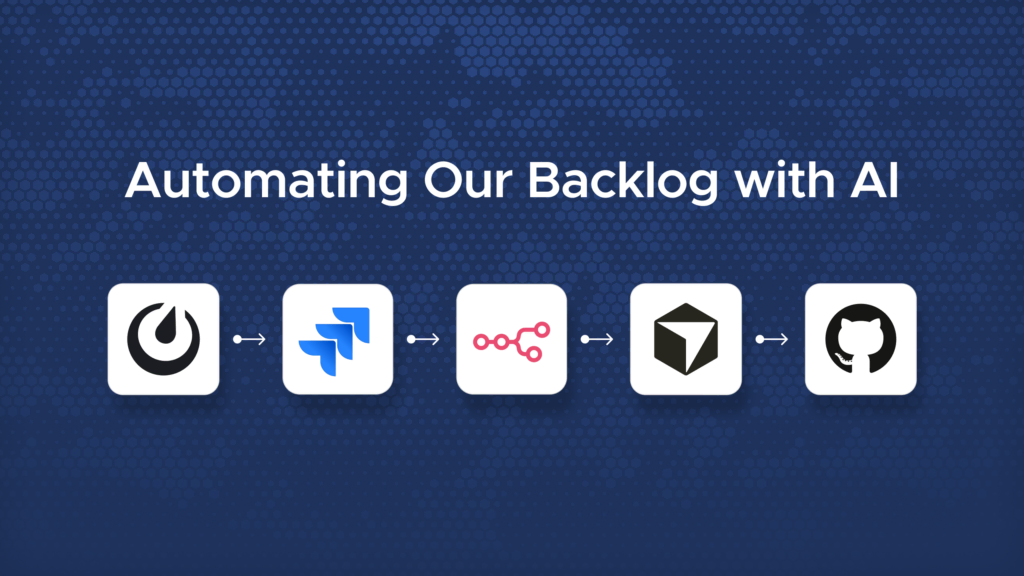
There are five main components:
- Mattermost — The starting point and the feedback loop. Anyone on the team can @mention Matty — our internal AI agent powered by the Mattermost Agents plugin — to request work. Matty creates a Jira ticket, assigns it to the automation user, and the pipeline takes over. Mattermost is also where the team gets notified when a PR is ready for review.
- Jira — The source of truth. Tickets tagged for automation get picked up when they move to “Selected for Development.”
- n8n — The orchestration layer. Filters and queues incoming tickets, triggers the agent, and exposes a set of MCP tools for the agent to call back into. Handles all the integration work with Jira, GitHub, and S3 so the agent doesn’t have to.
- Cursor Automations — The execution engine. A cloud-sandboxed AI agent that claims a ticket, writes code, runs tests, and opens a PR — all autonomously.
- GitHub — Where the code lands. The agent opens draft PRs, and n8n marks them ready for review once the ticket lifecycle is complete.
Setting up the Cursor Automations Environment
Before the agent can do any useful work, it needs an environment that mirrors your actual development setup. Cursor Automations run in cloud sandboxes, and you can configure a base VM snapshot that every future agent session starts from. Cursor provides an onboarding agent that walks you through this setup.
For our Mattermost use case, we needed a pretty specific environment. Here’s what went into our base snapshot:
Docker and a local Mattermost stack. Our agents need to be able to build and run Mattermost locally to verify their changes. We set up a full local development stack in the VM so the agent can spin it up, make changes, and confirm things work before pushing code.
Plugin installation instructions. Mattermost maintains a central monorepo for the server and web app, but many first-party plugins live in separate repositories. We provided the agent with instructions for how to find, download, build, and install plugins into the local development environment — because without that context, it would have no idea how our plugin ecosystem works.
The agent-browser CLI. Cursor’s Cloud Agent Desktops didn’t seem to make the initial Automations release, so we installed the agent-browser CLI as a workaround (we were using this in Cloud Agents before the desktops came out!). This gives the agent the ability to interact with a headless browser in its sandbox, which is essential for verifying UI changes.
AWS CLI for screenshot workflows. We wanted the agent to take before/after screenshots of its changes and attach them to pull requests — visual proof for reviewers that the agent’s work looks correct. The agent uses agent-browser to capture screenshots, then the AWS CLI to upload them to S3, and includes the URLs in the PR description.
This setup phase is an investment, but it pays off immediately. Every agent session boots from this snapshot with everything pre-configured, ready to clone, build, and test.
The n8n Workflows
The n8n side of this system is six interconnected workflows. Let’s walk through each one.
1. The Ticket Queue
This is the entry point. A Jira webhook fires every time a ticket changes, and this workflow filters for the ones we care about:
- Assigned to our automation user
- Tagged with the
mattylabel (our AI agent’s name) - Moved to the “Selected for Development” status
Tickets that pass the filter get their key fields extracted — ticket key, title, description, issue type, priority, components, and parent ticket info — and inserted into an n8n data table. This table acts as a simple queue: each row has a claimed flag that starts as false.
Once the ticket is queued, the workflow fires an HTTP POST to the Cursor Automations webhook with a message like: “A new Jira ticket has been queued for you with ID MM-12345. Call the claim_ticket tool to claim your assignment before doing anything else.”
2. The MCP Server
This is the heart of the integration. n8n exposes an MCP (Model Context Protocol) server that the Cursor agent connects to as a tool provider. The MCP server defines four tools:
claim_ticket— Claims the next unclaimed ticket from the queuefetch_jira_ticket— Gets full ticket details from Jirafetch_jira_attachment— Downloads a Jira attachment and stages it in S3mark_ticket_submitted— Wraps up the ticket lifecycle after the PR is created
This is a deliberate design choice. The agent doesn’t get direct access to Jira, GitHub, or S3. It gets four well-defined actions with clear inputs and outputs. If the agent tries to do something we haven’t accounted for (like grabbing another agent’s ticket), it simply can’t — the tool doesn’t exist or the workflow doesn’t allow it. This scoping is one of the biggest advantages of putting n8n in the middle.
3. Claim Ticket
When the agent calls claim_ticket, it provides light ticket information (title, description, etc). The workflow ensures that this ticket hasn’t already been claimed to prevent races, then transitions it to “In Progress” and provides the agent with the ticket data.
4. Fetch Jira Ticket
A straightforward lookup. The agent provides a ticket ID (like MM-1234), and n8n validates it exists in the queue, fetches the full issue from Jira’s API, and returns it. If the ticket has attachments — mockups, specs, screenshots — the response suggests calling fetch_jira_attachment next.
5. Fetch Jira Attachments
Jira attachments can’t be accessed directly from the Cursor sandbox. This workflow fetches the attachment and stages it somewhere the agent can access, returning a URL it can pull into its workspace.
6. Mark Submitted
This is the wrap-up workflow, and it does a lot:
- Updates the Jira ticket’s “QA Test Steps” custom field with testing instructions the agent wrote
- Posts a comment on the Jira ticket with the PR URL
- Transitions the ticket to “Submit PR” status
- Resets the
claimedflag in the queue - Fetches the GitHub PR and uses the GraphQL API to mark it as “Ready for Review” (converting it from draft)
The agent opens draft PRs by default — a safety net so nothing gets accidentally merged. This workflow flips them to ready-for-review as the final step, so that CodeRabbit picks up and starts reviewing.
What the Agent Actually Does
With all this infrastructure in place, here’s the agent’s actual workflow (that’s given through a lengthy system prompt) when it gets triggered:
- Calls
claim_ticket()— gets assigned a ticket, Jira moves to “In Progress.” The response includes a light description of the ticket. - Optionally calls
fetch_jira_ticket()if it wants the full ticket details — complete description, acceptance criteria, and context beyond whatclaim_ticketprovided - Calls
fetch_jira_attachment()if there are mockups or specs attached - Clones the repo, creates a branch, and uses
agent-browserto reproduce the bug or see the current state — capturing a “before” screenshot - Writes the fix, adds tests, and ensures all checks are passing
- Uses
agent-browseragain to verify the fix worked, capturing the “after” screenshot - Uploads screenshots to S3 via AWS CLI
- Opens a draft PR on GitHub with the before/after screenshots embedded
- Calls
mark_ticket_submitted(pr_url, qa_test_steps)— Jira updates, PR goes live, team gets notified, and CodeRabbit begins its first pass of review.
The whole thing runs without intervention. Someone @mentions Matty in Mattermost, a ticket gets created, and some time later a PR appears with code changes, screenshots, and QA test steps — with a notification back in Mattermost that it’s ready for review.
What We’ve Learned So Far
Here are some of the key lessons we’ve learned so far.
Scoping matters more than capability. The agent can theoretically do a lot, but the system works best when its options are constrained. Four MCP tools. One ticket at a time. A clear start-to-finish lifecycle. The more we narrowed the agent’s world, the more reliable it became.
The environment is half the battle. Getting the VM snapshot right — with Docker, the local dev stack, plugin tooling, browser CLI, and AWS credentials — took real effort. But it’s a one-time cost that every agent session benefits from. Skimping here means the agent wastes cycles (and tokens) figuring out environment issues instead of writing code.
n8n as middleware is a natural fit. Cursor Automations are designed to be triggered and extended through webhooks and MCP. n8n is designed to connect systems through webhooks and expose APIs. The two complement each other well. n8n handles the “glue” — filtering, queuing, state management, multi-step API calls — so the agent can focus on the actual development work.
Visual verification builds trust. The before/after screenshot workflow isn’t strictly necessary, but it dramatically increases reviewer confidence. When a PR from an AI agent includes screenshots showing exactly what changed in the UI, it’s much easier to review than a wall of diffs.
Start with the boring tickets. We’re not pointing this at architecture-level work. The sweet spot is well-specified tickets with clear acceptance criteria — plugin updates, UI tweaks, feature flags, configuration changes. The kind of work that’s important but not complex. That’s where the backlog tends to pile up anyway.
What’s Next
We’re still early. The system works, but we’re iterating on the edges: better error handling when the agent gets stuck, smarter ticket selection, and expanding the Agent’s ability to handle review feedback from CodeRabbit before any humans look at the PR. We’re also looking at tightening the feedback loop — having the agent post to Mattermost channels at key milestones, not just at the end.
If you’re curious about building something similar, the core stack is straightforward: n8n (self-hosted or cloud), Cursor with an Automations-enabled plan, and whatever project management and communication tools your team already uses.
The MCP integration pattern — n8n as a tool provider for the agent — is the key architectural decision that makes the whole thing manageable.
We’ll keep sharing what we learn as this evolves. In the meantime, if you want to try Cursor Automations yourself, cursor.com/onboard is the place to start.