Upgrade to Server ESR 10.11 and Desktop App ESR v5.13
Upgrade today to improve security and performance, compatibility, and UX
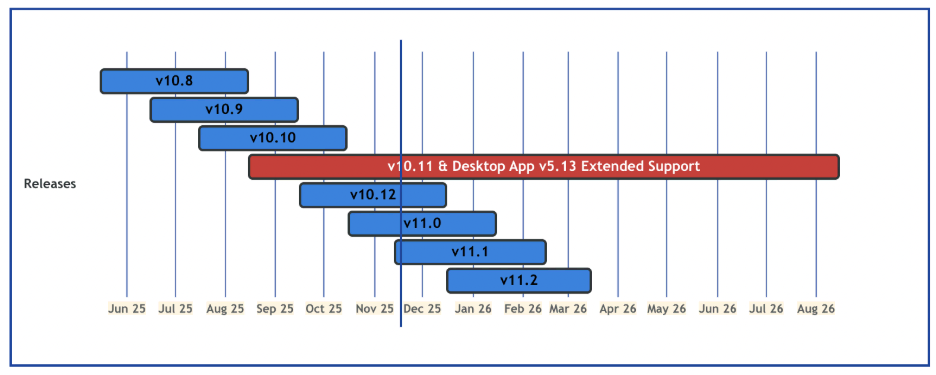
Mattermost server v10.11 has been implemented as a new Extended Support Release in August 2025. v10.11 will be supported until August 15, 2026 per our updated process. We have been maintaining v10.5 as our current ESR. This version has come to the end of its life cycle. Starting November 15, 2025, we are no longer backporting fixes to v10.5. Please upgrade your systems to v10.11 as soon as possible to continue to receive important bug fixes and security updates and to maintain client compatibility.
Additionally, Mattermost Desktop App v5.13 has been implemented as a new desktop app Extended Support Release in August 2025 and will be supported until August 15, 2026.
Extended Support Releases or ESRs are a strategic choice for organizations looking for stability and reduced frequency of updates. Using ESRs can minimize disruptions associated with frequent upgrades, making them an attractive option for environments where stability is paramount.
Why should I upgrade my server and desktop app version?
1. Security
See a full list of security updates for both server and clients.
2. Mobile app compatibility
As we innovate and offer newer versions of our mobile apps, we maintain backwards compatibility only with supported server versions. Users who upgrade to the newest mobile apps while being connected to an unsupported server version can be exposed to compatibility issues, which can cause crashes or severe bugs that break core functionality of the app.
3. New features and improved user experience
We add new features and user experience enhancements to our new versions regularly. See the server changelog and the desktop app changelog for a full list of the latest features, performance enhancements, bug fixes, and other improvements.
What’s new since the last server ESR release?
Here are some important changes and highlights since the v10.5 ESR release:
1. Breaking changes and deprecations. We have made some breaking changes and deprecations to improve system performance and security. For example, support for PostgreSQL v11 and v12 have been removed and the new minimum PostgreSQL version is v13+. Read more details in the important upgrade notes and in the changelog.
2. Improved security for mission-critical collaboration. We have introduced new security features such as biometric authentication and jailbreak detection for mobile. Additionally, our deeper integration with Microsoft products allows for seamless and secure collaboration across platforms. Read more details in this blog post.
How do I upgrade my server and desktop app?
To upgrade your server easily, first review the important upgrade notes and changelog to make sure you are aware of any actions you need to take before or after upgrading from your version. Then follow the upgrade guides for step-by-step instructions on how to upgrade your server, including downloading the latest server version and backing up your data and application.
To install and update the desktop app, first review the changelog to make sure you are aware of any actions you need to take before or after upgrading from your version. Then follow the install guide for step-by-step instructions on how to install and update the desktop app version.