



Sensitive data needs to be controlled, traceable, and visible — right down to the device. Mattermost v11.8 delivers on all three fronts with classification banners, automated data spillage reporting, and mobile ephemeral data controls, and also adds smarter workspace organization to keep operators focused the moment they log in.
Upgrade your Mattermost server today to start using these features.
Classification Markings: Server and Channel Banners
Mattermost Enterprise Advanced
Operational security depends on context. In high-stakes environments, knowing the classification level of a conversation before you type can be the difference between compliant exchanges and policy violations. When teams work across channels handling different sensitivity levels, that context needs to be crystal clear and continuous.
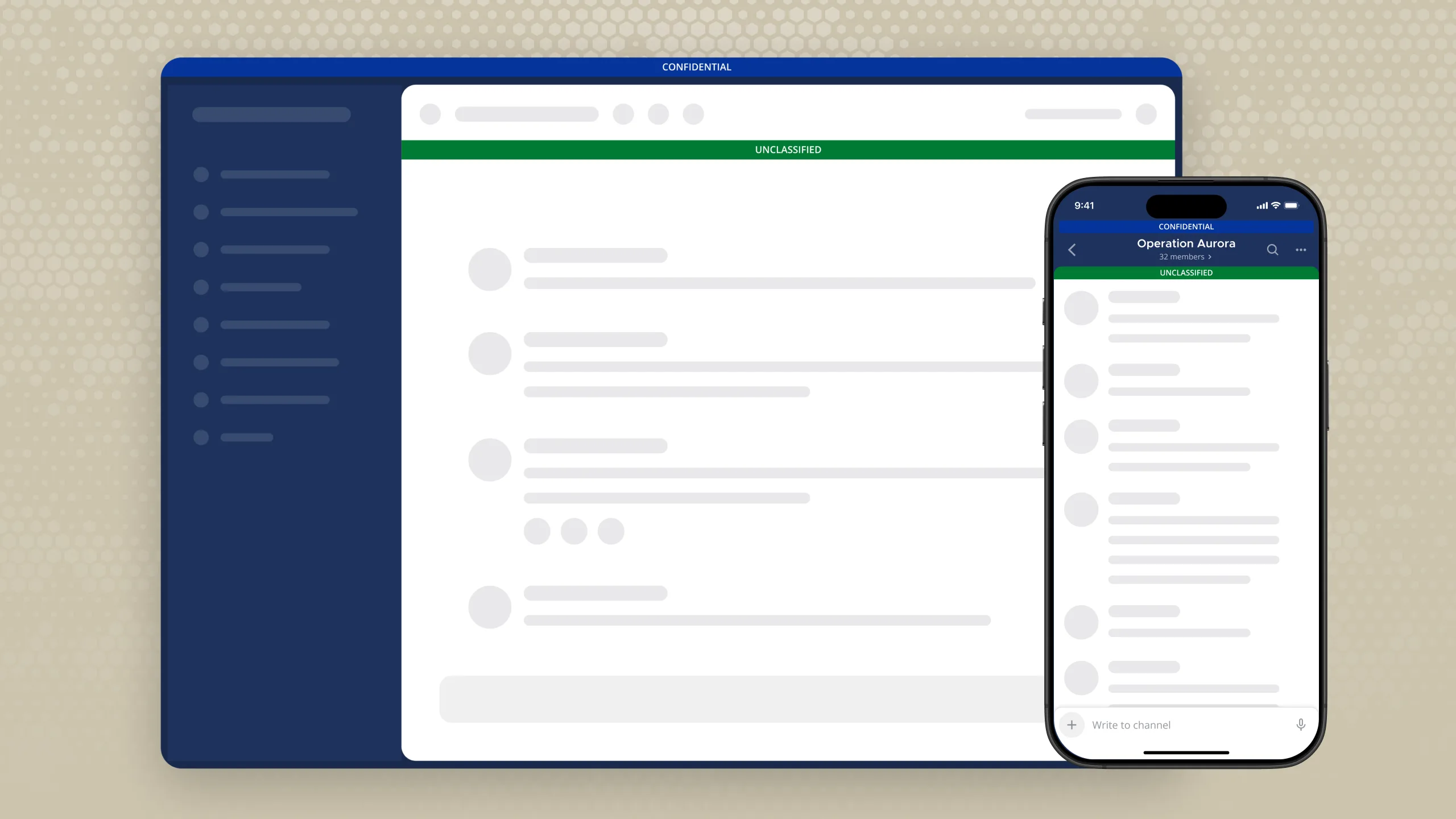
Mattermost v11.8 introduces classification banners at both the instance and the channel level. Admins, system admins, and channel admins can now label any channel with a classification marking displayed as a persistent color-coded banner so every operator and analyst knows exactly what environment they’re operating in.
Organizations can define their own classification levels and banner colors to match internal policy, or apply preset schemes aligned to U.S., UK (GSCP), Canada, Australia (PSPF), and NATO classification frameworks. Markings are currently informational only, with a future update planned to tie attribute-based access control (ABAC) policies directly to classification levels.
Security and compliance teams can now maintain consistent classification discipline across every workspace, with clear, persistent visual context at every level, and the groundwork in place for ABAC enforcement tied directly to channel classification.
Learn more about channel banners in Mattermost.
Data Spillage Report Generation
Mattermost Enterprise Advanced
In classified and sensitive environments, a confidential message posted in the wrong place is an incident that needs to be documented, traceable, and closed out properly — and teams need a clear record of what happened, who acted, and what was done about it.
Mattermost v11.8 gives teams the ability to automatically generate data spillage reports when such incidents occur. When a user flags a post for review — for example, confidential financial numbers mistakenly shared in a public channel — a designated reviewer assesses it, confirms whether the flag is valid, and adds a comment documenting their decision and action taken. That comment, along with the flagged content, any attachments or responses, and the full audit trail — who flagged it, when, why, and what the reviewer concluded — is automatically compiled into a downloadable incident report.
Security and compliance teams now have a structured, automatically generated record for every confirmed spillage — ready for incident response, chain-of-custody documentation, or compliance reporting, with no manual write-ups required.
Read more about data spillage report generation in Mattermost.
Mobile Ephemeral Mode
Mattermost Enterprise Advanced
Mobile devices present a unique challenge for secure operations. They move between networks, go offline, and accumulate cached data that can persist long after a session ends. For teams operating in classified or sensitive environments, managing that data lifecycle is mission-critical.
With Mattermost v11.8, admins can enable mobile ephemeral mode — a set of device-level data controls in the System Console — to define exactly how long sensitive data lives on mobile devices. Three settings govern the device’s data lifecycle:
- A disconnection timeout defines the grace period (e.g., 60 seconds) before a device that’s lost server connection is treated as offline, preventing false triggers from brief network interruptions
- An offline persistence timer sets how long cached content is retained after the device goes offline, in hours, after which cached content is deleted and session credentials are preserved (e.g., 24 hours)
- An auto cache cleanup interval sets the maximum age of any cached content in days, regardless of connection status, preventing unbounded accumulation of sensitive data. Setting this value to zero enables zero persistence mode, where content is never written to disk at all.
Security teams can now enforce organization-wide data retention policies at the device level, with fine-grained control over exactly how long sensitive content persists on mobile and a zero-persistence option for the most sensitive operating environments.
Learn more about Mattermost’s approach to mobile security.
Default Channel Categories
Mattermost Enterprise, Mattermost Enterprise Advanced
Onboarding onto a new platform or getting up to speed on a new mission is faster when your workspace is already organized. When team members join Mattermost and find dozens of uncategorized channels waiting for them, they spend time organizing their sidebars — time that should be spent on the mission.
Mattermost v11.8 enables admins to assign default sidebar categories — named groups in the Mattermost channel list — to channels so members see a structured workspace the moment they join. When creating a new channel or configuring an existing one, admins can type in a category name and assign the channel to it. That category then appears automatically in the sidebar for every member of the channel.
Admins set the starting point, and users own what comes next. Members can move channels between categories, collapse or expand them, or reorganize their sidebar entirely.
With this update, operations teams can now arrive in a structured workspace without any manual setup while admins spend less time fielding questions about channel organization and more time on high-value work.
Learn more about organizing your sidebar in Mattermost.
Breaking Changes
In the v11.8 release, the Custom Profile Attributes property group is renamed from custom_profile_attributes to access_control, and CPA fields and values are migrated from the legacy property model to the v2 model. The functionality of the CPA feature is unchanged. Plugin developers that use CPA will need to register against the new group name.
Try Mattermost v11.8 today
Upgrade your Mattermost server to start using these new capabilities.
For a complete list of updates and improvements included in this release, visit the Mattermost v11 Changelog.