


Mattermost v11.10 gives security admins tighter, faster control over who accesses what. ABAC governance now reaches team-level membership and native user attributes let admins write policies without any extra integration work. AI agents get more capable and reliable, too, with dynamic tool calling, on-demand file context, and automatic fallback if a model goes down. The release also adds Matrix federation, GCC High compliance support, and Dataminr alerting integration.
Read on for what’s new, or upgrade your Mattermost server to start using these features.
Team ABAC Membership
Mattermost Enterprise Advanced
Attribute-based access control (ABAC) gives admins precise, policy-driven governance over who can access a channel. Teams, the layer above channels, are the natural next place to extend that same model.
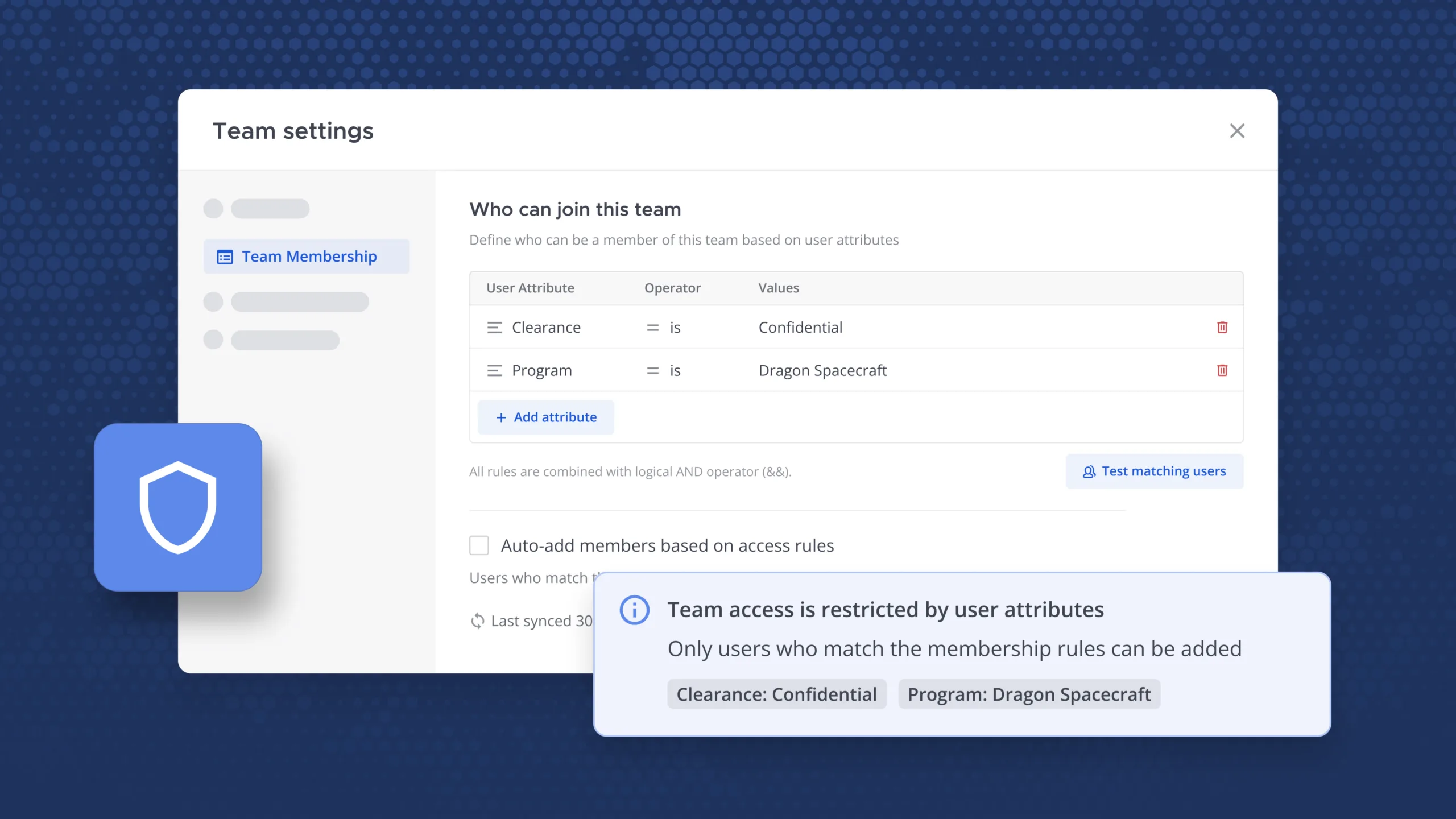
From Mattermost v11.10, system admins and team admins can now govern team access using the same user attributes and policies already used for channels. Access settings are now clearer too: the “invite only” checkbox has been improved with buttons indicating whether a team is private or open to anyone, with no behavior change for non-ABAC teams. For ABAC-governed teams, the distinction carries more weight: policy is advisory on public teams but strictly enforced on private ones.
From the team details screen, admins can attach an existing membership policy or define custom rules. Team admins get the same controls scoped to their own teams, so day-to-day governance doesn’t have to route through a system admin. When a policy sync changes membership, affected users get an automated notification explaining what happened and why.
As a result, organizations enjoy consistent, predictable attribute-based governance from teams down to individual channels, with team admins able to manage their own rules and users kept in the loop.
Learn more about ABAC in Mattermost.
Native User Attributes in ABAC
Mattermost Enterprise Advanced
Traditionally, standing up ABAC required extra groundwork before admins could write their first policy: provisioning custom user attributes and building an integration just to make data available in Mattermost. For resource-constrained organizations, that setup work has been a barrier to ABAC adoption.
Mattermost now ships with a set of native user attributes built in, enabling admins to write policies without any external integration. Starting with v11.10, attributes like email addresses, account creation date, and user type (e.g., human vs. bot) are available out of the box, with additional attributes being added over time.
From the policy creation screen, where admins define the rules that govern access, these attributes appear alongside any custom ones, ready to use in permission rules and membership policies (i.e., the rules that govern who can join a channel or team). For example, a rule might only allow desktop users to download files, limiting access for mobile users. Admins can test each rule before rolling it out to confirm exactly who it will and won’t affect.
This update enables customers to define meaningful ABAC policies from day one, using the attributes Mattermost already knows about the user.
Learn more about ABAC in Mattermost.
Classification Markings: Mobile
Mattermost Enterprise Advanced
Since Mattermost v11.8, classification markings — banners that show the classification level of servers, channels, and messages — have helped desktop and web users understand how sensitive their work is.
Mattermost v11.10 extends classification markings to mobile devices. A global banner reflects the classification level set for the server and follows users across the app, wherever they navigate. Channels can carry their own classification level, too, shown as a channel-level banner that updates immediately when changed. That context carries through to threads as well; opening a thread shows the classification of the channel it belongs to, so the hierarchy stays clear no matter how deep into a conversation someone is.
With this capability, mobile users always know the exact classification level they’re operating under, at the server, channel, and thread level, with no gap between the mobile and web experiences.
Learn more about channel banners in Mattermost.
Dataminr Plugin Enhancements
Mattermost Enterprise, Mattermost Enterprise Advanced
The Dataminr plugin brings real-time alerts into Mattermost. Until now, setting it up meant going through a system admin and the System Console just to establish a connection. And once connected, a channel received every alert Dataminr sent, with no way to customize the feed. For channels focused on a specific region or topic, that meant sorting through a lot of noise to find what mattered.
Starting with Mattermost v11.10, channel admins can now create their own alert subscriptions directly from the channel, without needing system admin access. Subscriptions can be filtered by location, either coordinates with a radius or a place name, as well as by priority level (standard, urgent, or flash) and by topic or watchlist. Channel admins can set up subscriptions through the UI or via slash command, and the same filtering options are available through API endpoints for teams building custom integrations.
This feature ensures Dataminr feeds are relevant to channels, enabling teams to increase focus without waiting on system admin setup.
Learn more about the Mattermost Dataminr plugin.
GCC High Support for the Embedded Microsoft Teams App
Mattermost Enterprise, Mattermost Enterprise Advanced
Mattermost’s embedded app for Microsoft Teams lets users access Mattermost without leaving their Teams environment. Until now, that integration was built to work with Microsoft’s commercial cloud, which left federal and defense customers running in GCC High or DoD cloud environments unable to use it.
With Mattermost v11.10, the embedded Teams app now supports GCC High and DoD clouds, alongside the commercial cloud. From the plugin’s settings, admins select which Microsoft cloud their tenant belongs to, and the plugin routes authentication and Microsoft Graph API calls to the correct environment.
As a result, federal and defense customers running in GCC High or DoD clouds can now embed Mattermost directly in Microsoft Teams, with the same setup experience as commercial cloud customers.
Learn more about embedding Mattermost in Microsoft Teams.
AI: Plugin MCP Servers, File Context and Dynamic Tool Calling, Model Fallback Support
Mattermost Enterprise, Mattermost Enterprise Advanced
As organizations connect more tools and data sources to Mattermost’s AI agents, there’s an opportunity to make that connectivity smarter. This release lets plugins expose their own tools directly, keeping agents focused on the right tools and files for the task, and keeping them running even if an underlying model goes down.
Here’s what’s new in Mattermost v11.10:
- Plugin MCP servers: Plugins can now register themselves as MCP servers, the same way a remote MCP server would. This lets Mattermost and customers build plugins that expose tools directly to agents. For example, the Playbooks plugin can now expose tools that let an agent create and populate a checklist on a user’s behalf.
- Dynamic tool calling: Rather than loading every available tool into context at once, agents can now search for and load only the tools relevant to the task at hand. This means organizations can connect as many tools as they need without overwhelming the model.
- File context: Attached files are no longer loaded into context in full by default. When a file is relevant to a request, the agent reads it on demand, paging through large files instead of loading everything upfront.
- Clarifying questions: Agents can now ask formatted follow-up questions when requests are ambiguous, e.g., asking which channel a user meant instead of guessing.
- Model fallback support: Admins can configure a fallback model for AI agents in the System Console. If a primary model becomes unavailable, whether a local model or a hosted provider, the agent automatically falls back to the next configured model, with no disruption to the user.
With these updates, customers can now build richer, tool-connected AI workflows in Mattermost, with agents that pull in the right tools and files on demand, ask for clarification instead of guessing, and keep running reliably even if a model goes down.
Learn more about Mattermost Agents.
Federation (Matrix Protocol Interoperability)
Mattermost Enterprise, Mattermost Enterprise Advanced
Organizations increasingly need to collaborate across boundaries with partners, contractors, or other agencies who may not be running Mattermost themselves. Without a shared, open protocol, that kind of cross-platform collaboration has typically meant asking one side to compromise, whether that’s leaving their existing tools or working through disconnected, one-off integrations.
Mattermost now bridges to Matrix, an open messaging protocol used by other platforms, enabling real-time bidirectional sync of messages, reactions, and edits between Mattermost and any Matrix-connected system. Messages appear as authentic user posts — with real names and avatars, not bot placeholders — and full formatting, emoji reactions, threads, and file attachments carry over in both directions.
Setup is handled through simple configuration with automatic registration file generation, and the bridge includes loop prevention, proper authentication, and namespace isolation to keep synchronization secure and reliable.
Customers can now collaborate in real time with any Matrix-connected organization, without asking anyone to leave their existing platform or maintain a custom integration.
Learn more about Matrix federation with Mattermost.
Extended Support Release Updates
Server v11.7 and Desktop App v6.2 have been implemented as new Extended Support Releases (ESRs) in May 2026. Per our release and support policy, both will be supported until May 15, 2027.
We have been maintaining server v10.11 and Desktop App v5.13 as our previous ESRs. These versions have come to the end of their life cycle. Starting August 15, 2026, we are no longer backporting fixes to either release. Please upgrade your systems to server v11.7 and Desktop App v6.2 as soon as possible to continue to receive important bug fixes and security updates and to maintain mobile compatibility.
ESRs are a strategic choice for organizations looking for stability and reduced frequency of updates. Using ESRs can minimize disruptions associated with frequent upgrades, making them an attractive option for environments where stability is paramount.
Try Mattermost v11.10 today
Upgrade your Mattermost server to start using these new capabilities.
For a complete list of updates and improvements included in this release, visit the Mattermost v11 Changelog.